Product exclusion – Excluding certain products from withdrawal
Overview
Under EU law, certain products are exempt from the 14-day right of withdrawal. The app helps you mark these products. If an order contains only excluded items, no withdrawal can be submitted via the form; for mixed orders, only non-excluded items are withdrawn/cancelled or returned.
In the app you will find more on the product exclusion block under Withdrawal guide (navigation): how to add the notice on the product page (storefront) and the same categories with legal basis.
Which products can be excluded?
Typical examples (legally relevant under the EU Consumer Rights Directive):
- Hygiene articles: e.g. underwear, swimwear, cosmetics after opening, contact lenses
- Personalized/customized items: e.g. engraved goods, custom photo products, customer-specific configurations
- Perishable goods: e.g. fresh food, flowers, medical products
- Digital content: e.g. software downloads, e-books, online courses (unless agreed otherwise) – excluded from withdrawal at all times, like personalized items (even before shipment/delivery)
- Event/time-bound goods: e.g. concert tickets, flight bookings, hotel reservations
- Newspapers/magazines (except subscriptions)
The exact legal classification is your responsibility; the app provides the technical means to mark products as "excluded from the right of withdrawal".
Setup via the admin block on the product page
The app provides a block on the product page in Shopify Admin ("EU Withdrawal Exclusion"). There you can mark products as excluded from withdrawal without editing metafields manually.
Adding and using the block
- In Shopify Admin open Products and select a product (or create a new one).
- Scroll down on the product detail page. The "EU Withdrawal Exclusion" block appears in a section below the product info (e.g. "Media", "Organization").
- If the block is not visible: Click "Add block" in a suitable section. Search the block list for "EU Withdrawal Exclusion" and add it.
- The block can be pinned so it stays visible.
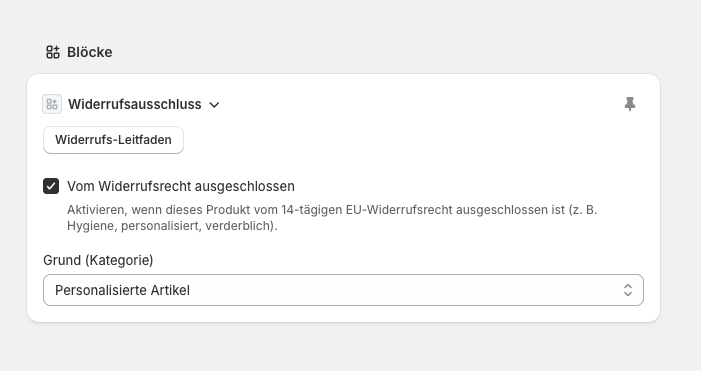
What can you set in the block?
- Excluded from right of withdrawal (checkbox): Enable when the product is exempt from the 14-day EU right of withdrawal.
- Reason (category): If excluded, choose the category:
- Hygiene articles
- Personalized articles
- Perishable goods
- Digital content
- Event/time-bound goods
- Current media (newspapers, magazines, etc.)
Changes are saved automatically; you only need to save the product as usual. The app uses this setting for every withdrawal request for orders containing this product.
Technical note: The product metafield legal.withdrawal_exclusion (JSON) is set. You can check it in metafields if needed; using the block is clearer.
Behaviour on withdrawal request
- All products in the order excluded: The withdrawal is rejected; the customer sees a specific message depending on category (e.g. "Digital content only – withdrawal not possible", "Hygiene articles only – no return after delivery", or "All items in this order are excluded from the right of withdrawal").
- Mixed order (partially excluded): The withdrawal is processed for non-excluded items (cancellation or return). Excluded items are mentioned in the confirmation or email.
- Only personalized or only digital products: If the order contains only products marked as personalized or digital, the app may reject the withdrawal entirely – even if not yet shipped (see FAQ if you see a related message). For other categories (e.g. hygiene, perishable), cancellation may still be possible before shipment.
For partially fulfilled orders (Plus, partial withdrawal) the same logic applies: fulfilled excluded items are not included in the return; unfulfilled excluded items (except personalized/digital) may still be cancelled.
Theme block – Withdrawal exclusion notice on the product page (storefront)
So that customers see on the product page in the storefront that a product is excluded from withdrawal, you can add the theme block "Withdrawal exclusion notice" ("EU Withdrawal Exclusion").
Adding the block in the theme
- In Shopify Admin open Online Store → Themes.
- Click Customize (Theme Editor) for the active theme.
- Select the product page (e.g. via the page selector or "Product pages").
- Open the section where the notice should appear (e.g. below the product description).
- Choose Add block.
- From the block list select "Withdrawal exclusion notice" or "EU Withdrawal Exclusion".
- Remember to Save.
The block only shows when the product is actually excluded from withdrawal. It does not appear for other products.
(Screenshot: Theme block "Withdrawal exclusion notice" on product page – see app.)
What can you customize on the theme block?
- Headline – Show or hide, custom text (e.g. "Right of withdrawal")
- Notice text – Default or your own wording (including translations per language)
- Design – Background colour, text colour, font size, border radius
- Custom CSS – Further customization
Exact options are in the Theme Editor under the block settings.
Legal basis
Exclusions follow Art. 16 of the EU Consumer Rights Directive (2011/83/EU). The final decision whether a specific product is excluded is yours as the merchant.